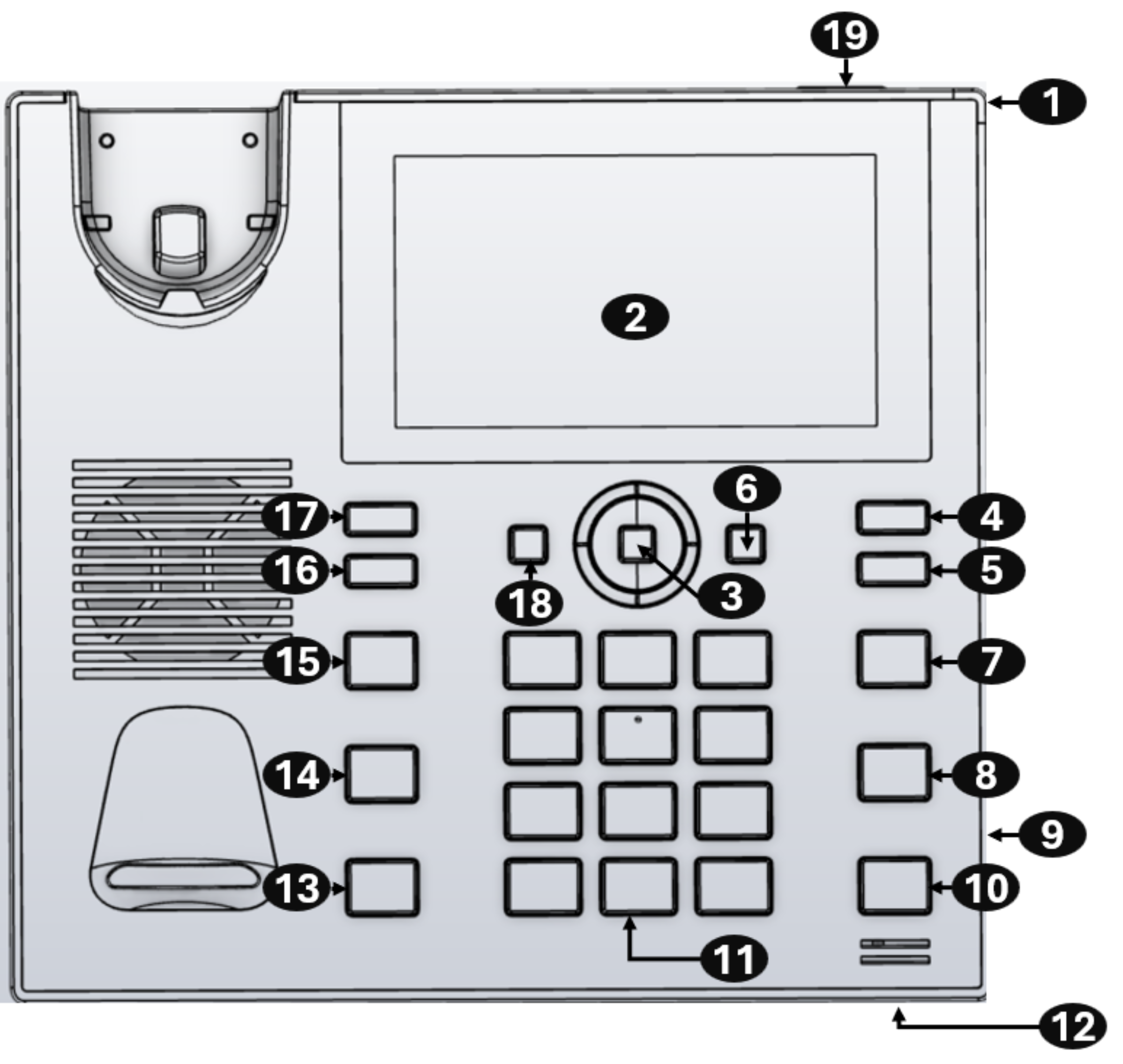
C456HD Front View
The front view of the phone is shown in the figure and described in the table.
|
Item # |
Label/Name |
Description |
||||||||||||
|---|---|---|---|---|---|---|---|---|---|---|---|---|---|---|
| 1 |
Ring LED |
Indicates phone status:
|
||||||||||||
| 2 |
TFT touch screen |
Thin Film Transistor touch screen, a type of LCD (Liquid Crystal Display) interactive screen which displays information and lets you configure features by touch. |
||||||||||||
| 3 |
Navigation Control / OK |
|
||||||||||||
| 4 |
Voicemail |
Retrieves voicemail messages. |
||||||||||||
| 5 |
CONTACTS |
Accesses the People screen. |
||||||||||||
| 6 |
MENU |
Accesses the Settings screen. |
||||||||||||
| 7 |
Smart Button
|
By default, returns you to the home (idle) screen from any screen. Can be configured to function as a redial button (see Enable the AudioCodes Smart Button for Redial Functionality). |
||||||||||||
| 8 |
TRANSFER |
Transfers a call. |
||||||||||||
| 9 |
Kensington lock |
Allows locking the device. |
||||||||||||
| 10 |
HOLD |
Places an active call on hold. |
||||||||||||
| 11 |
Alphanumerical Keypad |
Keys for entering numbers, alphabetical letters and symbols (e.g., colons). |
||||||||||||
| 12 |
Microphone* |
Allows talking and listening. The network administrator can disable it if required. |
||||||||||||
| 13 |
Speaker* |
Activates the speaker, allowing a hands-free conversation. |
||||||||||||
| 14 |
Headset |
Activates a call using an external headset. |
||||||||||||
| 15 |
Mute |
Mutes a call. |
||||||||||||
| 16 17 |
+ |
Increases or decreases the volume of the handset, headset, speaker, ring tone and call progress tones. |
||||||||||||
|
- |
||||||||||||||
| 18 |
'Back' key |
Returns you to the previous screen. |
||||||||||||
|
19 |
Action button |
Makes a 911 call (to be implemented) |
||||||||||||
|
*If your phone supports hardware mute (applies to devices with DBW - THM), the handset must be off-hook for the speaker and microphone to work. |
||||||||||||||

| ● | Differences exist between C456HD non-DBW and C456HD DBW. |
| ● | Both C456HD DBW and C456HD non DBW feature an optional Gen-2 expansion unit (not included in the preceding figure). |